Python Microservice Starter
Python as a general purpose language can be used in many ways. Here I describe how I scaffold it as a microservice starter. I have used this scaffolding for more than 10 microservices and it works well.
Microservices don't need to do a lot usually — just a few things. Load data from somewhere and send it to another place, keep something in memory, control a device with an exposed API for another service, and so on.
So why bother with structure if it's a "micro" service? The answer is simple: if you build dozens of microservices, it helps if they all look the same. Every service needs to load config — should it be YAML, TOML, or JSON? Every service exposes an API — it would be confusing to use different technologies across the fleet.
In a microservice environment each service is small and easy to understand on its own. But if you have dozens and they all look different, you start to wish for consistency. This Python starter solves that problem.
Architecture
First we need a good architectural structure. The picture below shows the hexagonal architecture we follow:
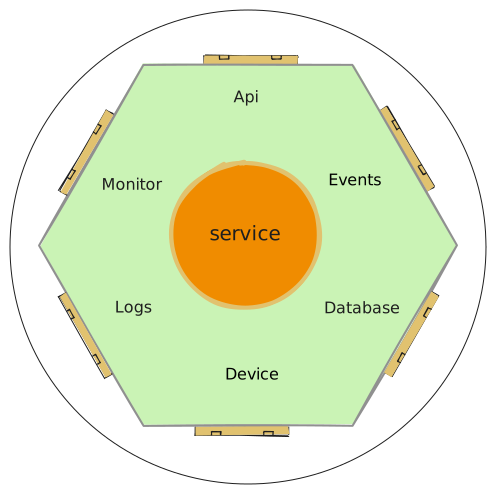
Service Core — This is where the business logic lives. The code should echo the business language using correct terms and expressions. During meetings we build up a shared vocabulary and regularly check it. It is important that the developer speaks the same language as the business person to avoid misunderstandings.
Adapters — The service core is surrounded by adapters (or ports) that connect to external services, subscribe to events, reach persistent data, or talk to devices. Adapters can also handle monitoring and logging. Ideally these are reusable across services — a developer should recognize familiar patterns at a quick glance.
The layered structure looks like this:
┌─────────────────────────────────┐
│   API Layer (Declarative)       │
│   FastAPI routers, middleware,  │
│   request/response models       │
└──────────────────┬──────────────┘
                   │
┌──────────────────▼──────────────┐
│   Service Layer (Business Logic)│
│   Domain models, business rules,│
│   orchestration                 │
└──────────────────┬──────────────┘
                   │
┌──────────────────▼──────────────┐
│   Adapter Layer (External Deps) │
│   Database, MQTT, device APIs,  │
│   logging, monitoring           │
└─────────────────────────────────┘
The project structure reflects this separation — with one pragmatic adjustment. In a strict hexagonal layout, the API and GUI would live inside the adapters folder. But in practice, the API is the main entry point of the service and the GUI is an operational tool for monitoring and quick interactions. Burying them two levels deep makes the codebase harder to navigate without adding any real architectural benefit. So we keep them at the top level, where developers expect to find them:
src/
├── api/              # FastAPI endpoints, middleware, models
├── gui/              # NiceGUI monitoring dashboard
├── service/          # Business logic (domain language)
├── adapters/         # External integrations
│   ├── db/           # PostgreSQL adapters (3 patterns)
│   ├── mqtt/         # MQTT broker integration
│   └── device/       # Device communication
├── config/           # Configuration management
├── main.py           # Application bootstrap
└── loggerhelper.py   # Custom logging utility
Tech Stack
Config Files
A microservice runs in different environments — unit tests, local development, staging, production — and each one needs different settings. Unit tests might use fake adapters instead of real databases. Local development connects to a different database than production. Kubernetes injects secrets through environment variables rather than files on disk. And a single test case might need to override one specific value without touching anything else.
To handle all of this cleanly, we use Pydantic Settings with TOML files and a layered override system. TOML (Tom's Obvious Minimal Language) is a configuration file format designed for high human readability — similar in purpose to JSON or YAML, but cleaner and less error-prone for config files. Each layer overwrites the previous one:
- TOML files (lowest priority) —
settings.tomlholds non-sensitive defaults. A second file,.secrets.toml(gitignored), adds credentials for local development. The later file overwrites the earlier, so secrets override defaults without duplicating them. - Environment variables — overwrite everything from the TOML files. This is how Kubernetes passes configuration through ConfigMaps and injects sensitive values from Secrets.
- Code initialization (highest priority) — overwrites everything. This is how a unit test sets a specific value for a single test case without touching any file.
# settings.toml
[default.database]
host = "localhost"
port = 5432
name = "mydb"
password = "<placeholder>"

# .secrets.toml (gitignored)
[default.database]
password = "the-real-password"  # overwrites the placeholder above
The config is validated at startup by Pydantic. If a required field is missing or has the wrong type, the service fails fast with a clear error message instead of crashing later at runtime.
FastAPI with Pydantic
FastAPI is the web framework. It gives us automatic Swagger documentation, request validation via Pydantic models, and async support out of the box.
Every service exposes its API through routers. The starter includes an example router with proper error handling and a custom exception handler that returns consistent error responses across all services.
@router.get("/users/{user_id}", response_model=UserResponse)
async def get_user(user_id: int):
    user = service.get_user(user_id)
    if not user:
        raise HTTPException(status_code=404, detail="User not found")
    return user
A logging middleware tracks request/response timing on every call — useful for spotting performance issues without adding instrumentation to each endpoint. Certain paths (like /monitor) can be excluded from logging to reduce noise.
Database
The starter includes three database adapter patterns, so you can pick what fits your use case:
SQL Files Pattern
SQL queries live in separate .sql files and are loaded at initialization. Good for complex queries where you want syntax highlighting and easy review.
Inline SQL Pattern
SQL is embedded directly in Python code using SQLModel/SQLAlchemy. More concise for simple CRUD operations.
ORM Model Pattern
Pure SQLModel with Pydantic integration. No raw SQL — the ORM generates everything. Best for straightforward data models where you want type safety end-to-end.
All three patterns have corresponding tests included in the starter.
Monitoring
Every microservice gets a built-in monitoring dashboard via NiceGUI, mounted at /monitor. It provides a web-based UI for checking service health, viewing real-time metrics, and inspecting state — without needing external monitoring tools during development.
This is especially useful in industrial environments where Grafana might not be set up yet, but you still need visibility into what the service is doing.
Logging
The starter includes a custom LoggerHelper that wraps Python's logging module with:
- File and stream handlers
- Consistent formatting with timestamps and log level indicators
- Custom tags for filtering (e.g.,
[DB],[MQTT],[API]) - Output to both console and
logs.txt
Graceful Shutdown
Microservices need to clean up properly — close database connections, finish processing messages, unsubscribe from MQTT topics. The starter uses a pub/sub pattern with pypubsub: when a SIGTERM or SIGINT arrives, a "terminate" message is broadcast. Each adapter subscribes to this message and handles its own cleanup.
This matters in Kubernetes where pods get a grace period to shut down before being killed.
Testing
The starter follows the test pyramid:
- Unit tests — Fast, no external dependencies. Test business logic in isolation.
- Integration tests — Test adapters against real services (PostgreSQL, Redis, MQTT via Docker Compose).
- End-to-end tests — Full scenario testing using generated API clients from the OpenAPI schema.
# pyproject.toml
[tool.pytest.ini_options]
testpaths = ["src", "test"]
python_files = ["*_test.py", "test_*.py"]
The CI pipeline runs unit and integration tests on every push, with PostgreSQL and Redis as GitHub Actions services.
Deployment
Docker
The Dockerfile uses multi-stage builds:
- Development stage: includes code-server, git, debugging tools
- Production stage: minimal image running
python src/main.py
# docker-compose.yml includes:
- PostgreSQL (port 5335)
- Redis (port 6379)
- Mosquitto MQTT broker (ports 1883, 9001)
- Ignition (for industrial projects)
CI/CD
The GitHub Actions pipeline has three reusable workflows:
- Test — Linting (Flake8 + Ruff), pytest with service containers
- Build — Docker buildx, push to Azure Container Registry with version tags (
v{YYYYMMDD}.{RUN_NUMBER}-{BRANCH}) - Release — Git tagging, Kubernetes manifest updates, deploy via ArgoCD
The release workflow supports multiple environments (dev, production) and only triggers on main and develop branches.
Kubernetes
Deployment uses Helm charts with Kustomize overlays for per-environment configuration. ArgoCD watches the repository and automatically syncs changes — true GitOps.
kubernetes/
├── base/          # Helm chart templates
└── overlays/      # Per-environment configs (dev, staging, prod)
Task Runner
The starter uses Invoke as a task runner for common operations:
invoke test       # Run all tests
invoke build      # Build Docker image with version tag
invoke push       # Push to container registry
invoke testdata   # Initialize test database
This keeps the frequently used commands short and consistent across all services built from this starter.