Handwritten Markdown: From Paper to Structured Text
I take a lot of handwritten notes — on tablets, in notebooks, on whatever is nearby. Writing by hand feels natural, and there are no distractions. But when I want to turn those notes into something searchable, editable, or shareable, the experience falls apart.
Cloud OCR services require subscriptions. Third-party tools chain together multiple services (Mathpix, Tesseract, LLMs) in fragile pipelines. None of them output structured Markdown. And none of them learn how I write.
This project is an attempt to solve all three problems at once: convert handwritten notes into clean Markdown, locally, with personalization built in. The initial prototype uses reMarkable tablet exports as its primary input source, but the approach works equally well with scanned paper documents.
The Problem
Handwriting recognition is a solved problem — for printed text on clean backgrounds. For actual handwriting, the challenges multiply:
- Messy input. Real notes have crossed-out words, arrows, margin scribbles, and varying sizes.
- No structure. OCR tools produce flat text. But notes have headers, quotes, lists, and diagrams — losing that structure defeats the purpose.
- Generic models. Everyone's handwriting is different. A model trained on general handwriting data will consistently misread your specific quirks.
- Privacy. Sending personal notes to cloud APIs is not always acceptable.
Existing solutions each solve one of these, but none solve all of them:
| Approach | Private | Learns Your Writing | Structured Output |
|---|---|---|---|
| Cloud APIs (Mathpix, Google Vision) | No | No | No |
| Local LLMs (Ollama + Mistral) | Yes | No | Basic |
| Research libraries (TrOCR, Nephi) | Yes | Possible | No |
| This project | Yes | Yes | Yes |
Markup Rules: Giving the Model Hints
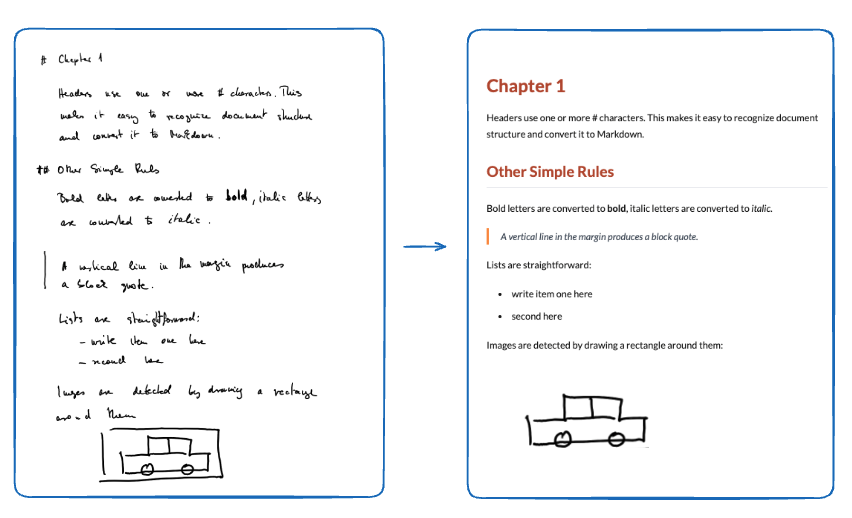
The key insight is that you can make handwriting recognition dramatically easier if you add a few simple conventions to how you write. I call these markup rules — lightweight symbols you add while writing that tell the system what structure to produce.
Structure markers (at the start of a line):
#→ Heading level 1##→ Heading level 2>→ Block quote- A drawn rectangle around a region → Image
Text formatting:
- Bold letters → converted to
**bold** - Italic letters → converted to
*italic* - Lists → simply start each item with a dash
Text mode markers:
- Normal text (no marker) → dictionary correction is applied. If the model reads "teh", it corrects to "the".
- Text wrapped in
'single quotes'→ literal mode. No correction. Useful for technical terms, code, or foreign words that would otherwise be "fixed" by the language model.
These rules are minimal enough that they don't interfere with natural note-taking, but they give the recognition pipeline strong structural signals. Instead of trying to infer whether something is a heading from its visual size (unreliable), the # marker makes it unambiguous.
How It Works
The system can read from multiple sources: reMarkable tablet exports, scanned documents, or photographed pages. No cloud sync, no API calls — just local file processing.
Example
Why Not Just Use an LLM?
Large language models can do handwriting recognition — you can feed a page image to a vision model and ask it to transcribe. But there are trade-offs:
- Cost and speed. Running a large vision model on every page is slow and expensive, even locally.
- No personalization. The LLM doesn't learn your handwriting over time.
- Inconsistent structure. LLMs are unpredictable about formatting. Sometimes they add headers, sometimes they don't. The markup rules give deterministic structure.
- Privacy. Cloud LLMs send your data to external servers. Local LLMs require significant hardware.
A specialized CRNN model trained on handwriting is smaller, faster, and — once fine-tuned on your data — more accurate for this specific task.
Current Status
The project is in its early stages. The data loading infrastructure works and the MNIST baseline validates the training pipeline. The markup rules are defined and documented.
If you want this project to be ready faster, give it a thumbs up!